Hub Entities
Each hub exposes diagnostic entities on the hub device so you can observe the rtl_433 server itself.
Connectivity
The Connectivity binary sensor is on while the hub's WebSocket connection is open and off otherwise. It flips off immediately when the server announces a shutdown instead of waiting for a silence timeout.
SDR and Meta Diagnostics
Read-only diagnostic sensors report the receiver's current configuration:
- Center frequency.
- Sample rate.
- Conversion mode.
- Hop interval.
- Gain, where an empty value reads as
auto. - Frequency correction in ppm.
The configured frequencies and hop_times arrays appear as attributes on the
center-frequency sensor.
Receiver Noise
Two diagnostic sensors track the receiver's noise floor, so you can graph RF noise over time and alert when it climbs high enough to drown out your devices:
- Noise level — the receiver's estimated noise level in dB.
- Minimum detection level — the auto-adjusted pulse-detection threshold in dB; transmissions weaker than this are not decoded.
rtl_433 only reports these when its auto-level feature is active, so run the
server with -Y autolevel and optionally -M noise:30 (a periodic report every
30 seconds). The config-file equivalents are:
pulse_detect autolevel
report_meta noise:30
With the Home Assistant add-on, put those two lines in the radio's optional
per-radio override file in the add-on config directory (see the add-on
documentation). Without them the sensors stay unknown. Note that autolevel
changes reception behavior by design: it continuously adapts the pulse
detector's minimum level to the measured noise floor.
The two sensors update on different schedules, and Minimum detection level
is the fussier of the pair. -M noise:30 emits a report every 30 seconds, but
that report carries only the noise estimate, so Noise level refreshes
steadily while Minimum detection level updates only at the moment
autolevel actually re-adjusts the threshold. rtl_433 re-adjusts only when the
estimated noise sits more than 3 dB below the configured minlevel (default
-12.1 dB, so roughly below -15 dB) and the new threshold differs from the
current one by more than 1 dB. Two consequences are worth knowing before you go
debugging:
- On a receiver whose noise floor is above about -15 dB,
autolevelnever engages and Minimum detection level staysunknownhowever long you wait. Check Noise level first: it decides whether the threshold can move at all. - rtl_433 fires a burst of adjustments while it converges at startup, then goes
quiet. The event stream carries no backlog, so a server that settled before
Home Assistant connected leaves the sensor
unknownuntil the noise floor drifts by more than 1 dB. To force an update, nudge the hub's Gain number entity far enough to move the floor, then set it back.
Unlike the sensors below, this data arrives over the event stream itself
(rtl_433 ≥ 23.11), so it works even when /cmd is proxied away behind a
WebSocket-only proxy.
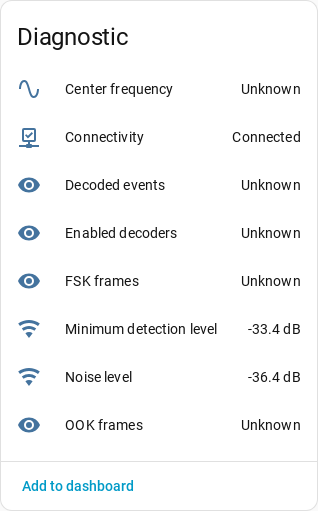
That capture is from a server reachable only over its WebSocket stream, which is
why the two noise sensors report while the /cmd-sourced sensors described below
read unknown.
Server Statistics
Server statistics include cumulative decoded events, OOK frames, FSK frames, and
enabled decoders. Per-protocol stats[] and the since timestamp appear as
attributes on the decoded-events sensor.
Hub observability data is fetched over HTTP from the rtl_433 server's /cmd
endpoint at the server root, http(s)://host:port/cmd, independent of the
configured WebSocket path. If a reverse proxy exposes only the WebSocket path and
not /cmd, these sensors degrade to unknown while the event stream and
connectivity sensor keep working.
Because those values come from the server, the diagnostic and statistics sensors
go unavailable as soon as the hub connection drops — the same gate that applies
to the devices, see Availability. Otherwise they
would keep showing a frozen reading. The Connectivity sensor stays available
throughout, and so do the SDR controls below: those are settings you write, not
readings you trust.
Managing SDR Settings from Home Assistant
By default a new hub adopts and manages the receiver's SDR settings. With Manage rtl_433 settings from Home Assistant enabled, the hub exposes controls under the hub device in the config entity category:
- Center frequency number in MHz, available only for single-frequency setups.
- Sample rate number in Hz.
- Frequency correction number in ppm.
- Gain number in dB paired with an Auto gain switch.
- Conversion mode select with
native,si, andcustomary. - Hop interval number in seconds, available only for multi-frequency hopping setups.
Frequency hopping must be configured in rtl_433. Home Assistant can adjust the hop interval after rtl_433 is already running with multiple frequencies, but it does not provide an entity for editing the frequency list.
On first connect, Home Assistant adopts the server's current settings into its desired state. It then re-applies managed settings on every reconnect so values survive rtl_433 restarts. If an initial frequency was configured during setup, that value is applied once and takes priority over the adopted frequency.
Once managed, change these settings in Home Assistant rather than editing the rtl_433 config directly. Home Assistant is the authority and will re-apply its stored values on the next reconnect.
Re-Syncing from rtl_433 Config
To pick up direct rtl_433 config edits:
- Turn Manage rtl_433 settings from Home Assistant off. This clears Home Assistant's stored desired state.
- Restart rtl_433 so it loads its config.
- Turn the toggle back on. On the next connect, Home Assistant re-adopts the server's current settings.
Requirements and Caveats
- The
/cmdendpoint must be reachable at the server root. - Hopping setups keep center frequency unmanaged so Home Assistant never pins a receiver to one frequency.
- The frequency list itself can only be set in the rtl_433 config.
- Multi-stage gain strings are not supported by the single gain control.
- Retuning does not widen the sample rate automatically; high-frequency bands may require manually increasing sample rate.
Turning management off removes the controls, stops Home Assistant from sending commands, and clears its stored desired state. The receiver's settings are left untouched.